Get recommended by ChatGPT, Gemini & Google AI.
More buyers now ask AI instead of Google. LinkHunter checks if your site is ready for AI search (GEO), finds the backlinks and directories AI engines trust — and builds them for you.
- 🔎Website audit40 checks
- 📈Backlink & DR check
- 🗂️Directory finder
- ⚡Form autofill
- ✨AI fix list
No account needed for the free audit. Rankings in AI answers are earned, never guaranteed.
- Clear answer in the first paragraphContent
- Organization & author schemaEntity
- Listed on trusted directoriesCitations
- Backlinks from relevant sitesAuthority
- FAQ with FAQPage schemaQ&A
- AI crawlers allowed · llms.txtAccess
40-check SEO audit
Content, indexing (robots.txt, sitemap, X-Robots-Tag), schema, performance, links and AI-search readiness — each issue with its severity and the fix.
DR & backlinks
Domain Rating, referring domains, backlinks and organic traffic for any domain — a few free checks every day.
Directory finder
See where a business is already listed and the trusted directories it is missing — then get listed with Directory Boost.
Form autofill
For the LinkHunter team: fill directory forms from the approved business profile in one click. CAPTCHAs are always left for a person.
Listing Vault
Saved logins for each directory listing, so updates later take seconds — encrypted, revealed only on request.
AI fixes & PDF reports
AI turns the audit into a prioritised fix list with example code. Export CSV or a branded PDF report in one click.
See it in action
Every number below is live data from the extension on a real business website.

- Severity + fix for every issue
- Indexing, schema, speed & GEO
- CSV & branded PDF report
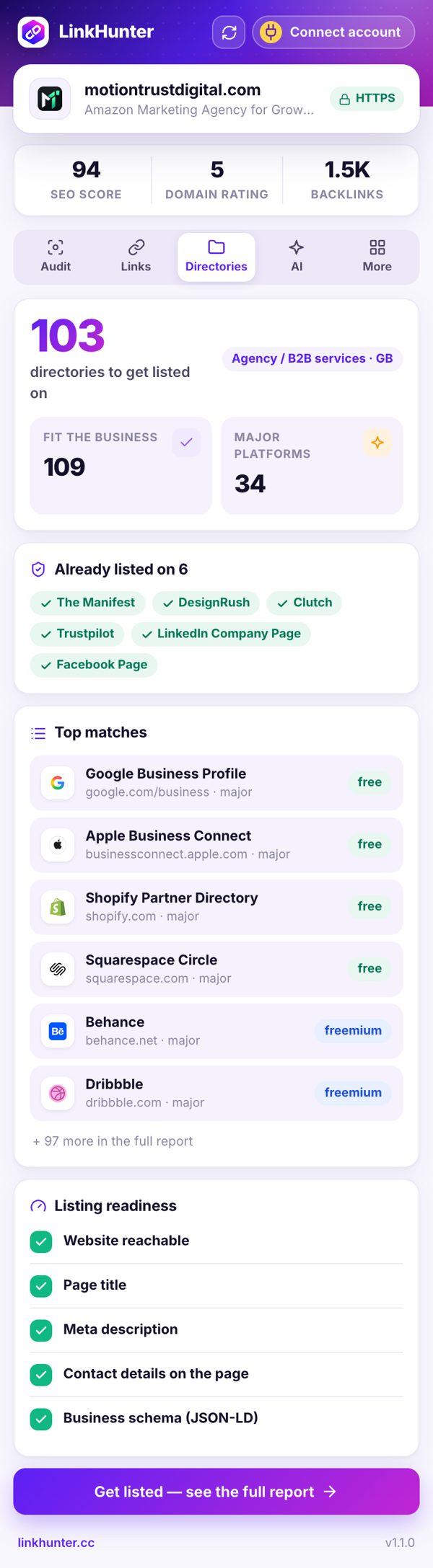
- Matched to industry & country
- Spots existing listings
- One click to get listed

- Ranked by impact & effort
- Copy-paste code & copy
- Written from this page’s audit

Install
The extension is on its way to the Chrome Web Store. Team members can install it now: download the ZIP, open chrome://extensions, switch on Developer mode, then drag the unzipped folder in (or “Load unpacked”).