Best Link Building Tools in 2026: 12 Compared by Workflow Stage
12 link building tools graded on seven jobs, from discovery to monitoring, with dated prices, compliance checks and an honest "skip it if" line for each.
Contents18 sections
- 1The best link building tool for each job
- 2What does link building software actually do?
- 3How we evaluated these tools (and our bias)
- 4Comparison table: 12 link building tools by workflow stage
- 5Link building software pricing, verified 28 October 2026
- 6Is Ahrefs or Semrush better for link building?
- 7Best outreach CRM on a budget: BuzzStream
- 8Is Pitchbox worth the price for agencies?
- 9Best AI-assisted outreach: Respona, Postaga and LinkHunter
- 10Best for finding contact emails: Hunter
- 11Best backlink monitoring tools
- 12Are there any free link building tools?
- 13Which link building tool is best for small businesses and solo SEOs?
- 14Can link building tools get you penalized by Google?
- 15How do you choose? A 5-question checklist
- 16The bottom line
- 17Frequently asked questions
- 18Sources
The best link building tools depend on the job. Ahrefs is best for backlink research, Hunter for finding emails, BuzzStream for a budget outreach CRM, Pitchbox for high-volume agency outreach, and Linkody or Google Search Console for monitoring. LinkHunter covers all seven stages with AI agents, while a person approves every commitment.
Key takeaways
- Research suites, outreach CRMs, email finders and monitors do different jobs, so grade tools by workflow stage.
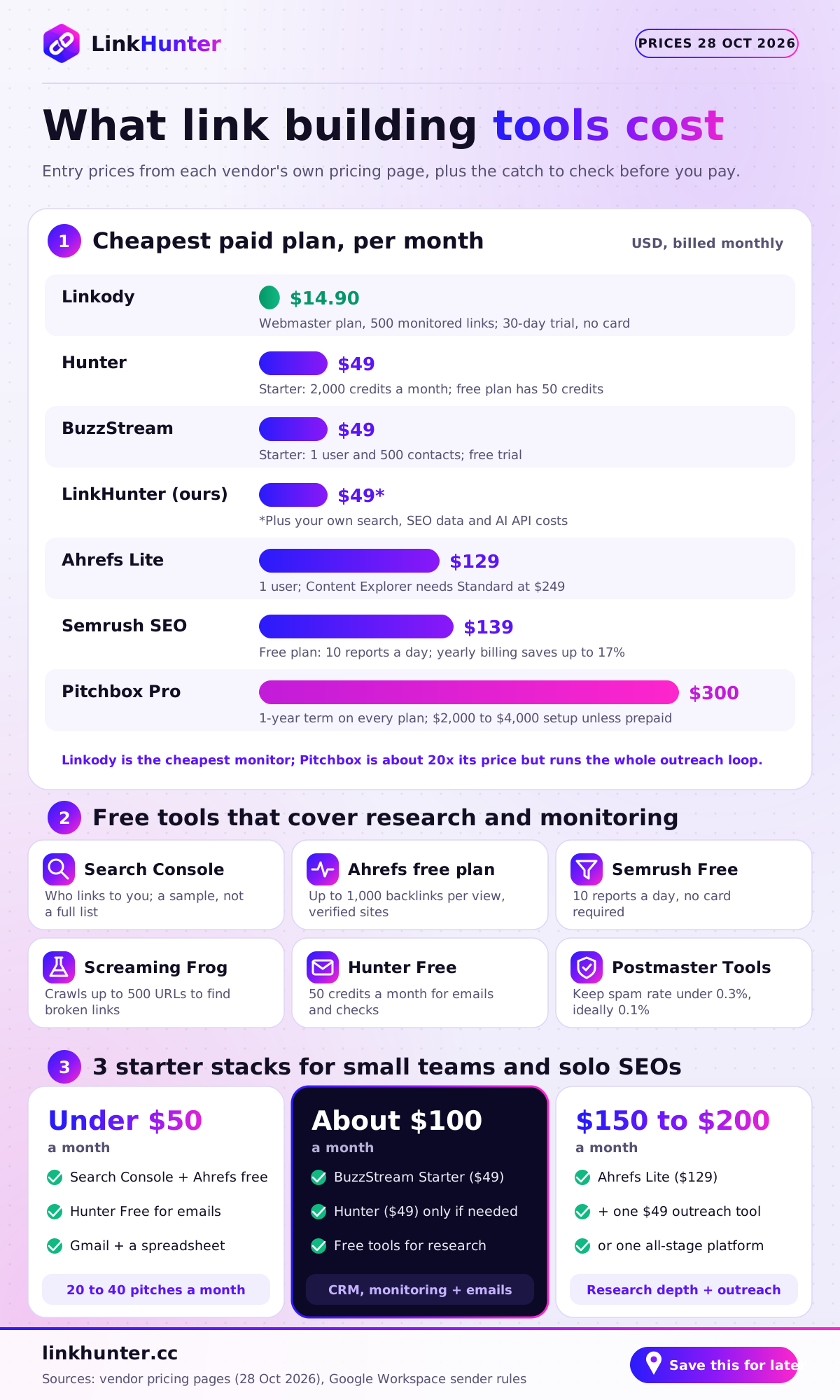
- Entry prices verified on 28 October 2026 run from $14.90 a month (Linkody) to $300 a month on a one-year term (Pitchbox Pro).
- Respona now sells placements at $100 to $500 each rather than software seats, which makes it a service, not a tool.
- Google treats automated link creation and paid links for ranking as link spam; how you use a tool matters most.
- Before buying, check for unsubscribe links, per-mailbox sending limits and rel="sponsored" tracking for paid links.
Most "best link building tools" lists come from a vendor that ranks itself first or an affiliate paid per signup. They put Ahrefs (a research database) next to BuzzStream (an outreach CRM) as if they were rivals, and quote prices with no date.
This guide grades 12 link building tools on the seven jobs a campaign actually needs: discover, qualify, contact, write, replies, negotiate and monitor. Every price was checked on the vendor's own pricing page on 28 October 2026. Each tool gets a "who should not buy this" line. And one disclosure up front: LinkHunter (linkhunter.cc) is our product. It is in this list, graded on the same matrix, with its gaps stated plainly.
The best link building tool for each job
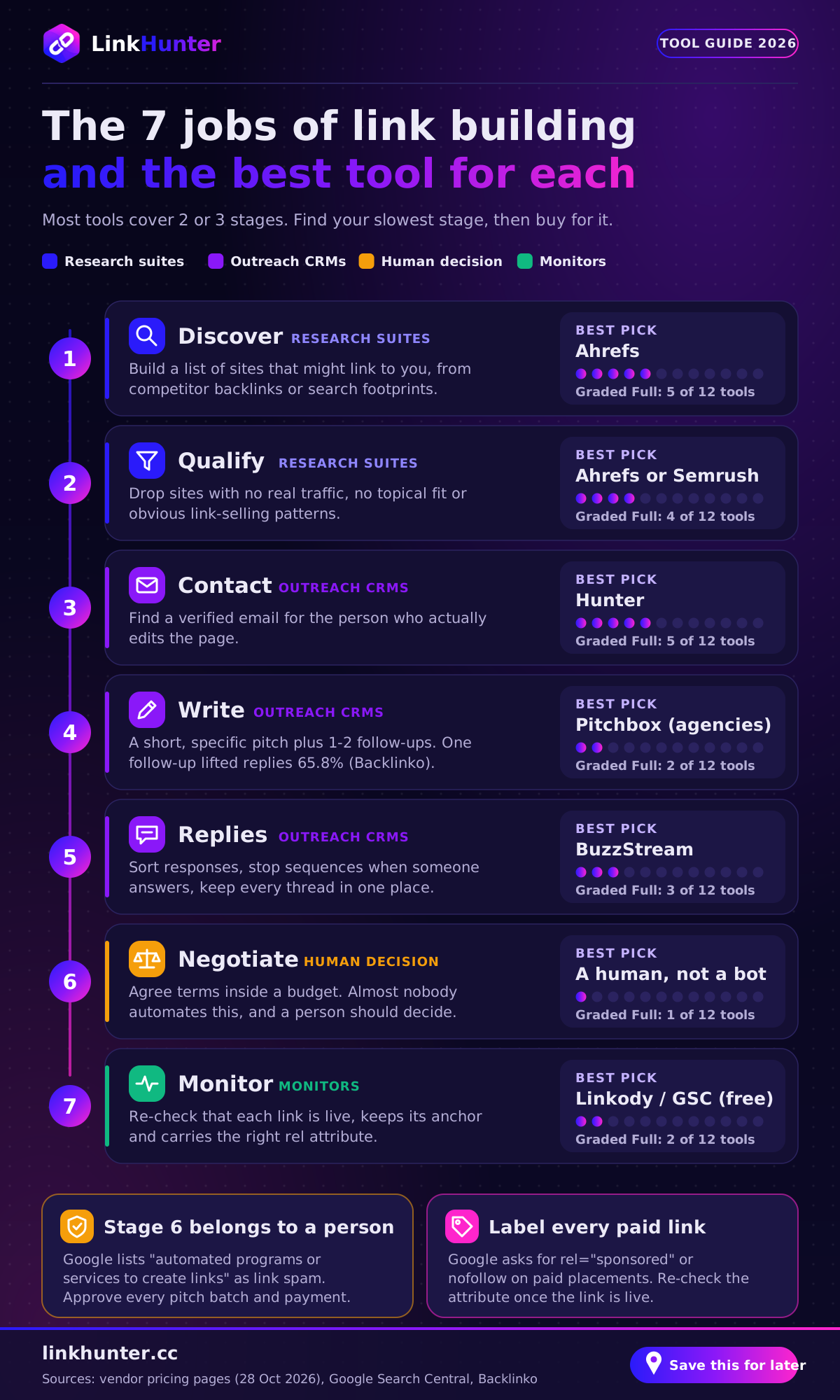
Here is the best pick for each job, based on the matrix further down.
- Best for backlink research: Ahrefs. Site Explorer is still the fastest way to see who links to a competitor.
- Best outreach CRM on a budget: BuzzStream, from $49 a month.
- Best for high-volume agency outreach: Pitchbox, if you send thousands of emails a month and can commit for a year.
- Best for finding contact emails: Hunter, with 50 free credits a month.
- Best done-for-you option: Respona, which now sells placements rather than software.
- Best AI agent platform covering all seven stages: LinkHunter (ours), with a human approving every commitment.
- Best backlink monitoring tool: Linkody for paid monitoring; Google Search Console for free.
What does link building software actually do?
Link building software is any tool that automates part of earning links from other websites: finding prospects, judging them, reaching the right person, and confirming the link went live. No mainstream product does all of it equally well, which is why most teams run a stack.
We split the work into seven stages:
- Discover. Build a list of sites that might link to you, usually from competitor backlinks or search footprints such as "best [topic] resources".
- Qualify. Throw out sites with no real traffic, no topical fit or obvious link-selling patterns.
- Contact. Find a verified email for the person who edits the page.
- Write. Draft a short, specific pitch plus one or two follow-ups.
- Replies. Sort responses, stop sequences when someone answers, keep threads in one place.
- Negotiate. Agree terms. When money is involved, keep it inside a budget and label the link correctly.
- Monitor. Re-check that each link is live, keeps its anchor and carries the right rel attribute.
Research suites own stages 1 and 2, outreach CRMs own 3 to 5 and monitors own 7. Stage 6 is the one almost nobody automates, which is fine: it is where a human should decide. For more on at stage 1, see how to find link building prospects.
How we evaluated these tools (and our bias)
We graded each tool on what its own product and pricing pages say it does today. Each stage gets Full (a core, documented feature), Partial (limited or needs a workaround) or a dash (not offered). Four rules kept us honest:
- Prices are dated. We loaded every pricing page on 28 October 2026. Where a site blocked our check, we say so instead of copying a review site's number.
- Every tool gets a "skip it if" line. A tool that is great for an agency can be a waste of money for a solo founder.
- Compliance counts. Unsubscribe handling, sending limits and paid-link labelling decide whether a campaign survives.
- Our bias is declared. We build LinkHunter, so we graded it only on live features and say where another tool fits better. More on who we are on our about page.
Comparison table: 12 link building tools by workflow stage
Read across a row to see what one tool covers; read down a column to see who is strongest at one job.
| Tool | Discover | Qualify | Contact | Write | Replies | Negotiate | Monitor |
|---|---|---|---|---|---|---|---|
| Ahrefs | Full | Full | – | – | – | – | Partial |
| Semrush | Full | Full | Partial | Partial | Partial | – | Partial |
| Google Search Console | – | – | – | – | – | – | Partial |
| Screaming Frog | Partial | Partial | – | – | – | – | Partial |
| BuzzStream | Partial | Partial | Full | Partial | Full | Manual | Partial |
| Pitchbox | Full | Full | Full | Full | Full | Partial (AI agent) | Partial |
| Respona | Managed service: you order placements, their team runs the work | Dashboard | |||||
| Postaga* | Full | Partial | Full | Partial | Partial | – | – |
| LinkHunter (ours) | Full | Full | Full | Full | Full | Full (human approval) | Full |
| Hunter | Partial | – | Full | Partial | Partial | – | – |
| Linkody | Partial | – | – | – | – | – | Full |
| Google Postmaster Tools | Not a link tool: it shows the spam rate and reputation of your sending domain, which decides whether outreach lands in the inbox | ||||||
*Postaga's site blocked our checks on the review date, so its row reflects its long-standing feature set. Confirm it in a trial.
Link building software pricing, verified 28 October 2026
Entry prices range from $14.90 to $300 a month, but sticker prices hide commitments and add-ons. Full plan details are on our pricing page for LinkHunter and on each vendor's site for the rest.
| Tool | Free option | Paid plans (billed monthly) | Watch out for |
|---|---|---|---|
| Ahrefs | Free plan for verified sites | Lite $129, Standard $249, Advanced $449, Enterprise $1,499 (annual only) | Content Explorer and broken backlinks start on Standard; Lite is 1 user |
| Semrush | Free: 10 reports a day; 7-day trial | SEO $139, Starter $199, Pro+ $299 | Annual billing saves up to 17% |
| Google Search Console | Free | – | Links report is a sample, capped at 1,000 rows per table |
| Screaming Frog | Free up to 500 URLs | £199 per licence per year | Desktop crawler; no outreach |
| BuzzStream | Free trial | Starter $49, Growth $174, Professional $424, Custom from $999 | Starter is 1 user and 500 contacts; the page also shows an older, cheaper plan table, so confirm which applies |
| Pitchbox | Trial after a demo call | Pro $300, Advanced $600, Scale $1,200 (or $210 / $420 / $825 billed annually) | One-year commitment on every plan; implementation fee of $2,000 to $4,000 unless you prepay annually |
| Respona | – | $100 to $500 per placement, by DR and traffic tier | You are buying placements; Google requires paid links to be labelled |
| Postaga | Not verified | Not verified (site blocked our check) | Ask for current limits in writing |
| LinkHunter (ours) | 14-day trial, no card | Starter $49, Growth $149, Agency $399 | Search, SEO data and AI usage are billed by those providers to your own API keys |
| Hunter | Free: 50 credits a month | Starter $49, Growth $149, Scale $299 (about 30% less billed yearly) | Credits reset monthly and do not roll over |
| Linkody | 30-day trial, no card | Webmaster $14.90 (500 links) up to Agency XL $153.90 (50,000 links) | Annual plans include 3 months free |
Is Ahrefs or Semrush better for link building?
Ahrefs is better for backlink research; Semrush is better if you want research and basic outreach in one subscription. Both are research suites first, so neither replaces a real outreach tool for a team sending hundreds of pitches a month.
Ahrefs: best for backlink research
Ahrefs is the tool most link builders open first. Site Explorer shows every known link to a competitor, and Content Explorer finds pages on a topic that already earn links. Its free plan lets you see up to 1,000 backlinks at once for sites you verify, plus link types such as nofollow, UGC and sponsored.
The catch is plan gating: Content Explorer and the broken backlinks report sit on Standard ($249 a month), not Lite ($129). If prospecting is why you are buying, budget for Standard.
Who should not buy it: teams whose bottleneck is outreach. Ahrefs finds prospects; it does not email them.
Semrush: best all-in-one suite for SEO teams
Semrush covers similar research ground with Backlink Gap, which lists domains linking to competitors but not to you. Its Link Building Tool goes a step further than Ahrefs: Semrush's knowledge base says you can connect a Gmail, Outlook, Office 365 or Exchange mailbox and send pitches, follow up and track replies from inside the suite. That earns it Partial grades on contact, write and replies.
The SEO plan is $139 a month billed monthly, with a free plan (10 reports a day) and a seven-day trial.
Who should not buy it: a dedicated outreach team. The built-in outreach suits a few dozen pitches, not a team CRM.
Best outreach CRM on a budget: BuzzStream
BuzzStream is the best low-cost outreach CRM because it handles stages 3 to 5 cleanly and adds link monitoring on every plan.
On its website, BuzzStream describes AI-assisted contact discovery, templated outreach at scale, and a CRM that tracks activity, conversations and responses so two teammates do not pitch the same editor. Starter costs $49 a month for one user, 500 contacts, 30 prospecting searches and 1,000 monitored links. Growth is $174 for three users and 25,000 contacts.
One oddity: the same page also shows an older comparison table with plans called Solo, Starter, Plus and Premium at lower prices. Ask which table is current before you sign.
Who should not buy it: teams that need discovery in the same tool. With 30 prospecting searches on Starter, you will still feed it from Ahrefs or Semrush.
Is Pitchbox worth the price for agencies?
Pitchbox is worth it if you run outreach for several clients and send thousands of emails a month; for anyone smaller, the one-year commitment is the problem. It is the most complete traditional link building tool for agencies here.
Pitchbox covers discovery from keywords or competitor domains, built-in SEO metrics (with optional Ahrefs, Semrush, Moz or Majestic connections), contact enrichment, AI-drafted personalized emails and a unified inbox with a CRM built for link building. Its homepage also describes an AI Reply Agent that can handle negotiations, which is why it gets a Partial grade on stage 6.
Pricing on 28 October 2026:
- Pro: $300 a month ($210 billed annually), 2 users, 2 email accounts, 2,000 outreach emails a month.
- Advanced: $600 a month ($420 annually), unlimited users, 6 email accounts, 5,000 emails, 25 workspaces.
- Scale: $1,200 a month ($825 annually), 20 email accounts, 25,000 emails.
Every plan carries a one-year commitment, even when billed monthly, and the free trial is gated behind a demo call. Expert-led implementation costs $2,000 to $4,000 unless you prepay the year.
Pitchbox supplied the 12 million emails behind Backlinko's outreach study, which found only 8.5% of outreach emails got a response and one follow-up lifted replies by 65.8%. The data is from 2019, but the follow-up lesson holds.
Who should not buy it: solo SEOs, founders and in-house teams sending fewer than 500 pitches a month. We compare cheaper options in Pitchbox alternatives.
Best AI-assisted outreach: Respona, Postaga and LinkHunter
"AI link building tool" now covers three different things: a managed service that uses AI internally, an outreach tool with AI writing help, and agent platforms that run several stages for you.
Respona: now a pay-per-placement service
Many older lists still describe Respona as outreach software. In late 2026 its site describes "an AI-powered link-building product with a pay-per-result model": you choose a publisher tier and pay per placement, from $100 (DR 20+) to $500 (DR 60+), with volume discounts starting at 10% for $3,000 a month. Standard turnaround is 28 days, and you can pay extra to pre-approve every domain.
That is a service, not a tool. Placements you pay for are paid links, and Google asks for rel="sponsored" on "advertisements or paid placements".
Who should not buy it: teams that want to own their publisher relationships. Ask how links are tagged before you order.
Postaga: AI-assisted campaigns for small teams
Postaga has long been known for its Opportunity Finder, which suggests prospects by campaign type (guest posts, resource pages, roundups), plus contact discovery and follow-up sequences with AI help on personalization. Its website blocked our checks on the review date, so we cannot confirm current pricing or limits.
Who should not buy it: agencies needing multi-client workspaces and detailed reporting, and anyone who needs pricing in writing before a trial.
LinkHunter (ours): seven AI agents with human approval
LinkHunter is the only tool in this list that has a dedicated feature for every stage. Seven agents split the work: Prospect Hunter (discovery through Brave Search and DataForSEO competitor backlinks), Quality Analyzer (a transparent score where every component and weight is visible, and missing metrics show as "not available" rather than guessed), Contact Finder, Outreach Writer, Reply Manager, Negotiator and Backlink Monitor.
The design choice that matters most is the approval gate. The Negotiator extracts a publisher's price, compares it to your maximum and drafts a counteroffer, but it never commits money; a person approves every deal. Outreach includes an unsubscribe link and per-mailbox sending limits, with no mailbox rotation, and paid placements are recorded as sponsored or nofollow and re-checked once live. The full list is on our features page.
Plans are $49, $149 and $399 a month, and every account starts with a 14-day trial with no card. Search, SEO data and AI calls run on your own provider accounts, which keeps our price low but adds a second bill.
Who should not buy it: teams that only need backlink research (Ahrefs is deeper), anyone wanting a hands-off service (our agents wait for approval by design), and agencies that need years of integrations. LinkHunter is newer than BuzzStream or Pitchbox, and it shows.
Best for finding contact emails: Hunter
Hunter is the best standalone tool for stage 3: finding and verifying the email of the person who can edit a page. Domain Search lists a site's published addresses, Email Finder looks up a named person, and verification flags risky ones.
The free plan gives 50 credits a month. One credit is used per email found and half a credit per verification. Starter is $49 a month (2,000 credits, three connected email accounts), and yearly billing cuts about 30%. Hunter also offers sequences from connected mailboxes, which earns it Partial grades on write and replies.
Who should not buy it: teams whose outreach tool already includes contact discovery, such as BuzzStream or Pitchbox. You would be paying twice for the same lookup.
Best backlink monitoring tools
For a paid backlink monitoring tool, Linkody is the best value; for free monitoring, use Google Search Console. Monitoring is the stage most teams skip, and links quietly disappear after redesigns.
Linkody watches links you specify and emails you about new links or status changes, including when a backlink starts pointing to a 404. Plans start at $14.90 a month for 500 links and reach $153.90 for 50,000, with a 30-day trial that needs no card. Competitor links do not count toward your quota.
Google Search Console is free and comes straight from Google. Its Links report shows top linking sites, top linked pages and top anchor text, with exports of up to 100,000 rows. The limit is that it is a sample, not a full list, and it will not tell you the day a specific placement vanished.
Who should not buy a separate monitor: anyone whose outreach tool already re-checks placed links, as BuzzStream, Pitchbox and LinkHunter do. Check that it verifies the rel attribute too.
Are there any free link building tools?
Yes. Free link building tools cover research and monitoring well; they do not cover outreach at scale.
- Google Search Console: who links to you and which pages earn links.
- Ahrefs free plan: up to 1,000 backlinks per view for sites you verify.
- Semrush Free: 10 reports a day, no card required.
- Screaming Frog SEO Spider: crawls up to 500 URLs, enough to check prospects for broken links.
- Hunter Free: 50 credits a month for emails and verification.
- Google Postmaster Tools: your spam rate and domain reputation with Gmail.
That last one is underrated. Google's sender guidelines ask senders to keep the Postmaster Tools spam rate under 0.3%, ideally below 0.1%. One careless campaign can push a small domain past that line.
Which link building tool is best for small businesses and solo SEOs?
For a small business or solo SEO, the best setup is one paid outreach tool plus free research tools, for roughly $50 to $150 a month. Here are three stacks we would actually run.
- Under $50 a month: Search Console and Ahrefs' free plan for research, Hunter Free for emails, Gmail plus a spreadsheet. Slow, but fine for 20 to 40 pitches a month.
- Around $100 a month: BuzzStream Starter ($49) for the CRM and monitoring, Hunter Starter ($49) only if you run out of contacts, free tools for research.
- Around $150 to $200 a month: Ahrefs Lite ($129) for research plus one $49 outreach tool, or one platform that covers all stages, such as LinkHunter's Starter plan plus your provider costs.
Whether guest posting can scale at all is a recurring question on r/Blogging. Our answer: tools make volume possible, but replies come from relevance. Our link building outreach playbook covers the part software cannot do for you.
Can link building tools get you penalized by Google?
Tools do not get you penalized; the links you build with them can. Google's spam policies list "buying or selling links for ranking purposes", "using automated programs or services to create links to your site" and "excessive link exchanges" as link spam.
Email law adds a second layer. The FTC's CAN-SPAM guide requires a clear way to opt out, honoring opt-outs within 10 business days and a valid postal address, with penalties of up to $53,088 per violating email. Before you buy any backlink outreach tool, run these checks in the trial:
| Check | What good looks like | Why it matters |
|---|---|---|
| Unsubscribe handling | Every email can carry an opt-out, and opt-outs stop all future sequences automatically | CAN-SPAM opt-out rules; Gmail asks bulk senders for one-click unsubscribe |
| Sending limits | Daily caps per mailbox that you set, and sequences that stop on reply | Keeps your spam rate under Google's 0.3% ceiling |
| Mailbox rotation | Not used to dodge limits; one honest sender identity per campaign | Rotating many inboxes to hide volume is a spam pattern and burns domains |
| Paid-link tagging | Each paid placement is recorded and verified as rel="sponsored" or nofollow | Google's guidance on qualifying paid links |
| Human approval | A person approves pitch batches and any payment | Avoids "automated programs or services to create links" |
If a tool's main pitch is more emails from more inboxes, treat that as a warning. For the full checklist, read how to automate link building without getting penalized.
How do you choose? A 5-question checklist
Pick the tool that fixes your slowest stage, then fill gaps with free tools. Five questions get you there.
- Where do you lose the most time? Mark the stage in the matrix. Research gaps point to Ahrefs or Semrush; reply chaos points to BuzzStream or Pitchbox.
- How many pitches do you send a month? Under 200, use free tools and one $49 plan. Over 2,000, the Pitchbox tiers start to make sense.
- Do you need multiple clients or seats? Agencies need workspaces and per-client reporting; check user limits, because Ahrefs Lite and BuzzStream Starter are both one user.
- Can you commit for a year? If not, rule out Pitchbox and look at month-to-month plans.
- Does it pass the compliance checks above? If a vendor cannot show you unsubscribe handling and sponsored-link tracking, move on.
The bottom line
The best link building tools are the ones that fix your slowest stage. Ahrefs wins research, Hunter wins email lookup, BuzzStream is the budget CRM, Pitchbox is the agency workhorse if you can commit, and Linkody or Search Console keep earned links honest. For all seven stages in one place with a person approving every deal, try LinkHunter free for 14 days; otherwise, the stacks above will serve you well.
Frequently asked questions
What is the best tool for link building?
There is no single best tool, because link building has seven jobs. Ahrefs leads research, Hunter finds emails, BuzzStream is the cheap outreach CRM and Pitchbox handles agency-scale outreach. If you want one platform that runs discovery through monitoring with human approval, LinkHunter covers every stage.
Is Ahrefs or Semrush better for link building?
Ahrefs is better for pure backlink research: Site Explorer and Content Explorer are the standard way to find who links to competitors. Semrush is better if you want outreach in the same suite, since its Link Building Tool sends pitches from a connected Gmail or Outlook mailbox. Ahrefs Lite starts at $129 a month and Semrush SEO at $139 a month.
Is Pitchbox worth the price?
Pitchbox is worth it for agencies sending thousands of pitches a month across several clients. Pro costs $300 a month on a one-year term and includes 2,000 outreach emails and two users. For a solo SEO or a team sending under 500 emails a month, the commitment is hard to justify; BuzzStream, Hunter or our Pitchbox alternatives list will fit better.
Are there any free link building tools?
Yes. Google Search Console shows a sample of sites linking to you. Ahrefs has a free plan for verified sites with up to 1,000 backlinks per view. Semrush Free gives 10 reports a day, Screaming Frog crawls up to 500 URLs for free, and Hunter includes 50 credits a month. None runs outreach at scale.
Can link building be automated?
Parts of it can. Discovery, scoring, contact lookup, first drafts, reply sorting and link checks all automate well. What should not be automated is the decision to publish or pay: Google lists "using automated programs or services to create links" as link spam. Keep a person approving every pitch batch and every deal. Our guide on how to automate link building safely goes deeper.
What tools do SEO agencies use for outreach?
Most agencies pair a research suite (Ahrefs or Semrush) with an outreach platform such as Pitchbox or BuzzStream, which support multiple users, workspaces and client reporting. Hunter fills email gaps and a monitor like Linkody tracks delivered links. AI-agent platforms like LinkHunter suit agencies that want fewer tools to stitch together.
Is BuzzStream good for link building?
Yes, especially for small teams that want a clean outreach CRM. BuzzStream finds contacts, tracks every conversation and monitors placed links. Its Starter plan is $49 a month for one user and 500 contacts, with a free trial. It is weaker at discovery than Ahrefs, so most teams feed it prospects from a research tool.
How much do link building tools cost per month?
On 28 October 2026, entry plans cost $14.90 (Linkody), $49 (Hunter, BuzzStream, LinkHunter), $129 (Ahrefs Lite), $139 (Semrush SEO) and $300 on a one-year term (Pitchbox Pro). A typical small-team stack lands between $100 and $250 a month. See our full link building cost breakdown for per-link and agency prices.
Sources
- Google Search Central: Spam policies for Google web search (link spam)developers.google.com
- Google Search Central: Qualify your outbound links to Googledevelopers.google.com
- Google Workspace Admin Help: Email sender guidelinessupport.google.com
- FTC: CAN-SPAM Act compliance guide for businessftc.gov
- Search Console Help: Links reportsupport.google.com
- Backlinko: We analyzed 12 million outreach emails (data from Pitchbox, 2019)backlinko.com
- Ahrefs: An analysis of AI Overview brand visibility factors (75K brands studied)ahrefs.com
- Ahrefs pricingahrefs.com
- Ahrefs free plan (Webmaster Tools)ahrefs.com
- Semrush pricingsemrush.com
- BuzzStream plans and pricingbuzzstream.com
- Pitchbox pricingpitchbox.com
- Respona pricingrespona.com
- Hunter pricinghunter.io
- Linkody planslinkody.com
- Screaming Frog SEO Spider pricingscreamingfrog.co.uk

About the author
Monjur Hossain
Founder, LinkHunter
Monjur founded LinkHunter (linkhunter.cc) and MotionTrust Digital, where he has led marketplace strategy since 2022. He has eight years in e-commerce and marketplace marketing and writes these guides from the work of building an AI link-building platform: what earns links, what gets ignored, and where a person still needs to make the call.